# Send your group to Raidar Trending

1. Open Raidar’s **Options/Settings** (**/options** or **/settings**)

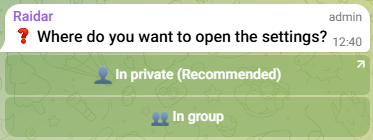
<figure><img src="https://1789729705-files.gitbook.io/~/files/v0/b/gitbook-x-prod.appspot.com/o/spaces%2F9YqpOAGBLJOyH9qZZG0X%2Fuploads%2Fvsx5tmbkbk85ORqf7u6D%2FImage1.png?alt=media&#x26;token=613a554c-a406-4869-9b69-caf45b5c8018" alt="Choose to work with Raidar in DMs or in your group"><figcaption></figcaption></figure>

2. Tap **In Group** or **In Private**

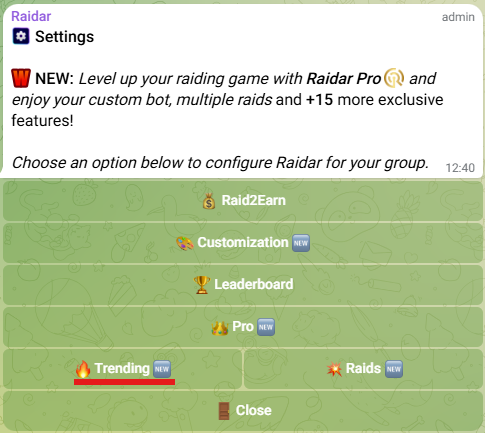
<figure><img src="https://1789729705-files.gitbook.io/~/files/v0/b/gitbook-x-prod.appspot.com/o/spaces%2F9YqpOAGBLJOyH9qZZG0X%2Fuploads%2F5hTGjPfatGn91blhPbVK%2FImage1.png?alt=media&#x26;token=ff484a61-16df-415d-84d1-cfca10db8495" alt="Trending button highlighted"><figcaption></figcaption></figure>

2. Tap **Trending**

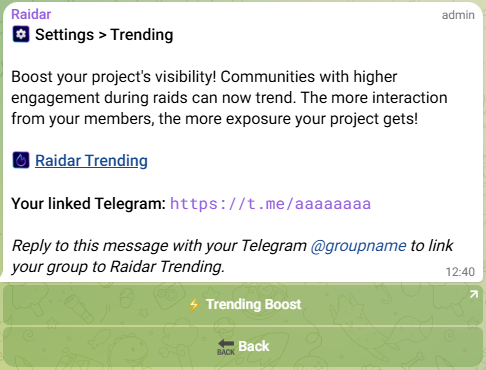
<figure><img src="https://1789729705-files.gitbook.io/~/files/v0/b/gitbook-x-prod.appspot.com/o/spaces%2F9YqpOAGBLJOyH9qZZG0X%2Fuploads%2F9gBgNrCf8D5WZPkiCW63%2FImage1.png?alt=media&#x26;token=1f641a3c-b0c0-439e-870d-6f11fb80da58" alt="Reply here with your group&#x27;s Telegram name"><figcaption></figcaption></figure>

3. **Reply** to Raidar’s message with your group’s **@username** (e.g., @YourGroup)
<h2 align="center"><mark style="color:green;">Your group now appears on @R<strong>aidarTrending!</strong></mark></h2>